Getting Started
Introduction
URL
The root URL of the Flatchr API is: https://api.flatchr.io.
Format
The API follows the REST format and all incoming or outgoing data is in JSON format encoded in UTF-8.
It is the responsibility of the web service client to ensure that the transmitted characters do not contain "exotic" symbols (for example, text copied/pasted from Word may contain characters such as curly quotes or bullets that are not supported by the web service).
The responses returned by the API are accompanied by HTTP protocol status codes reflecting the execution state of the request on the flatchr.io platform.
Security
It is important to note that API calls can only be made over HTTPS and that each connection is logged with the caller's IP address.
Before any implementation, please validate the suitability of this service with your Flatchr contact.
Help
For any errors you may encounter while using our API, you can first check the error status by consulting this page
Authentication
Token
Your API_KEY must be generated in your Flatchr workspace under Advanced Settings > Advanced > API.
Flatchr uses the OAuth token authentication system to authorize access to its API.
The OAuth token must be included in all requests:
- In the request header:
Authorization: Bearer API_KEY - Or through a query argument:
?token=API_KEY
Company Slug
For certain requests you will need your slug, which is the unique reference for your company found in the URL of your career site.
It is also available under Advanced Settings > Advanced > Subdomain configuration
Example: in https://flatchr.flatchr.io, flatchr is the unique reference or "slug"
Company ID
For certain requests you will need your company key, which is the unique identifier that defines your company in our data.
It can be found under Advanced Settings > Advanced > API
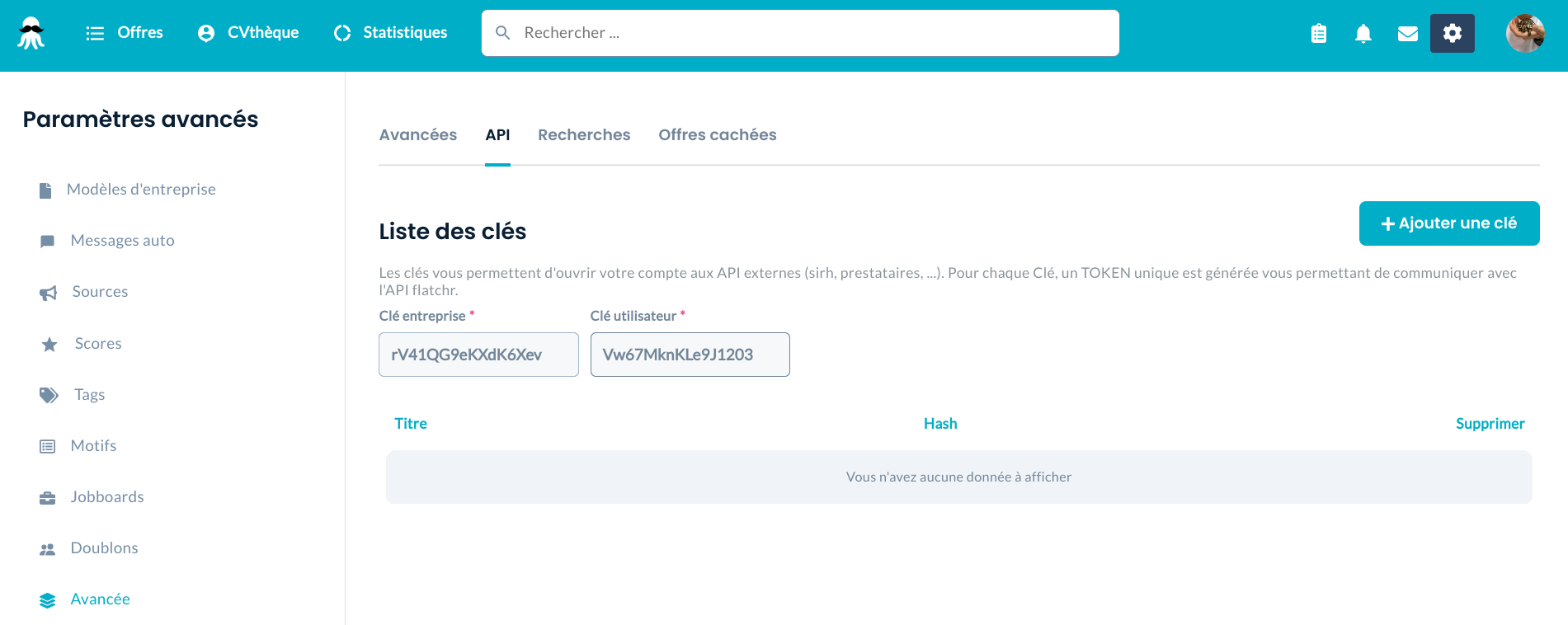
Here the company key is rV41QG9eKXdK6Xev